
Free app to explore and manage files
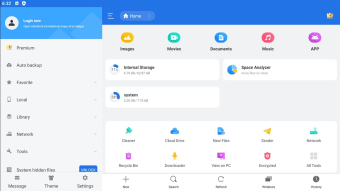
ES File Explorer is a free file finder and application manager developed by EStrongs Inc. With this app, you can easily navigate through the folders in your device. This makes it easy to find, open, move, copy, and transfer files between different locations in your gadget,
Top Recommended Alternative

Essentially, ES File Explorer works just like other file management apps such as File Manager or X-plore File Manager. These apps let you view the contents of your device in a hierarchical format without the need to connect it to a PC or use any of the built-in device suites that require wired connections.
Access all your files from one app
With ES File Explorer, you can easily look for the files you need. You can either scan the folders manually, or you can use the search bar and just type in the file name you’re looking for. Aside from presenting the files in an easily accessible folder format, the app also allows you to access locations that would otherwise be inaccessible to you through your operating system. This lets you view system files. However, note that modifying system files could cause apps to stop working properly.
Another impressive feature of this file manager is its built-in download manager capability. It offers support for some of the most popular cloud storage platforms like Google Drive, Dropbox, and OneDrive. This lets the app access your files and move them between your device storage and your cloud storage without the need for another third-party application. Right within the same app, you can directly check and move files from local to online locations.
The app also offers support for compressed files (ZIP and RAR files), so you can view what these files contain without having to use another third-party app to extract their contents on a separate location. With this alternative, you can view these files directly unless they are password-protected. Additionally, you can also create your own encrypted compressed files within the app by moving files into a new ZIP or RAR file.
Media playback and handy extras
For media files, ES File Explorer has built-in viewers and playback tools to let you preview them without leaving the app. It supports multiple formats, so you can pretty much open any file you want, from images and videos to music and even documents. Other features include an app manager to uninstall, sort, or back up your applications, and a simple note-taker for quickly jotting down thoughts.
It also comes with tools that help with storage and memory management, like an SD card analyzer if you have one inserted into your devices, and a task killer to help close background applications to free up RAM. Use the cache cleaner to remove unused or leftover files, and the auto-start manager to see what processes are running on device start-up.
Use at your own risk
One major problem with ES File Explorer is that its developers were caught engaging in click fraud, which means the app generates ad revenue by clicking on ads without users being aware. This practice led to the app's removal from app stores, and there’s still uncertainty about whether the fraudulent feature has been eliminated. Importantly, this issue does not compromise any sensitive user information.
Additionally, users experience frequent pop-up ads while using the app, whether they are browsing directories, transferring files, or checking device content. These intrusive ads can be quite annoying, often forcing users to wait before they can dismiss them. Furthermore, the small size of the close button adds to the frustration of navigating the app.
Works but with setbacks
In conclusion, ES File Explorer serves as a versatile file management tool with features like cloud storage integration and support for compressed files. However, its history of click fraud and persistent pop-up ads is a significant drawback that may deter users. While it effectively facilitates navigation and file handling, prospective users should weigh these setbacks against its benefits to determine if it's the right choice for their needs.